Project Summary
As the company shifted focus and teams restructured, the company Help Center became outdated. Here is the story of how I successfully relaunched it.
I currently still maintain the site; however, the company has since been acquired, and I have modified and rebranded the site.
Problems to Solve
- Low Traffic: The site was unorganized, leading users to submit questions via tickets rather than search for content.
- Outdated Content: No one was monitoring to update articles or archive old content as it became outdated.
- Design: The design was a template with company style guide applied. There was no unique personality to the site.
- Not a Self-Service Site: The company goal was to have a self-service site for clients to understand the product and solve problems on their on with limited support from the company.
- Accessibility: The site did not meet accessibility requirements.
Design Requirements
- Organized by product
- Easy onboarding for new clients
- Inviting Community
- Company color scheme
- Desktop Focused (user data shows very few access via mobile)
- Make the site accessible and educate authors within the company on accessibility standards.
Wireframe

Wireframe designed in Figma
The links below the search bar include everything a new user needs to get started with the product.
The Community link is included at the top as well as the bottom to encourage user engagement.
Each product has its on clickable icon.
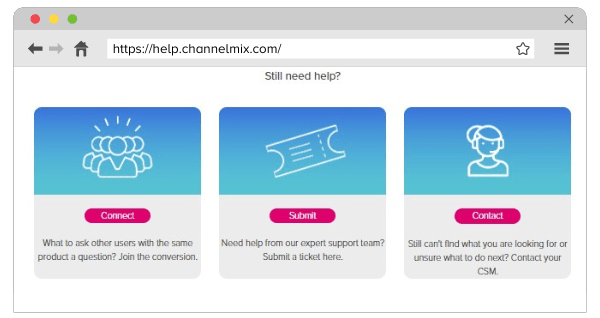
The request for tickets is included at the bottom under “Still Need Help?” to encourage self-service.
A menu is placed on the footer for easy navigation throughout the site.
Design
The site was coded using a template modified using HTML and CSS.
The images shown were used for marketing materials related to the Help Center.

Analysis
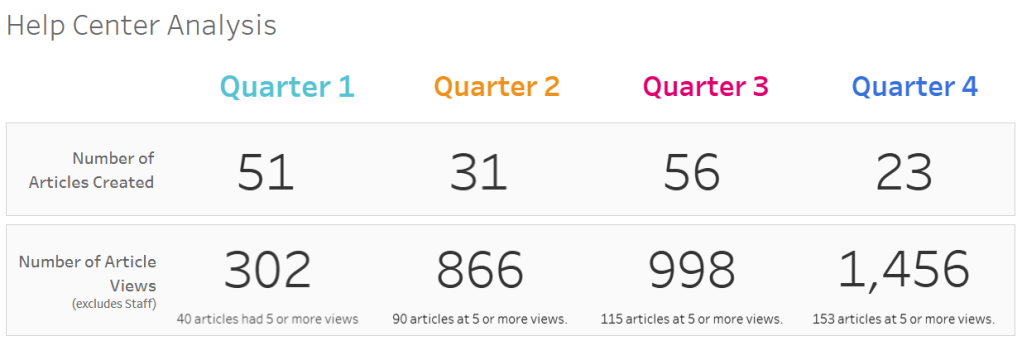
The site was relaunched at the very end if Q4. I performed user analysis to show continuous growth of content as well as outside users. Below is the KPI scorecard from my analysis using Tableau.
Training Video
Below is a video I produced training users on how to navigate the site.
 Lauren Lovvorn